Wednesday, August 14, 2013

Dynamic Windows Explorer Taskbar Icons

Dynamic Windows Explorer Taskbar Icons

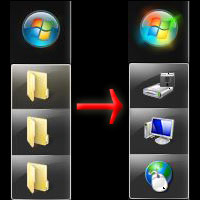
Before


After
If you're like me, you probably copy, move and delete files using Windows Explorer and end up with several Explorer windows open at the same time. If you have the Windows taskbar docked on the side of your screen, the ungrouped icons all look the same.

Windows provides a very easy and effective solution with custom folder icons. Select a folder you use regularly and open the folder properties then go to the Customize tab.

Then click "Change Icon" and select the icon that best fits that folder. Several icons are provide with windows, however there are plenty of free icon libraries available on the web.

That's it! Now whenever an Explorer window is open to that folder the taskbar icon will change to indicate the current location.

If you have any feedback or helpful tips, please leave a comment below or contact me directly.

Saturday, July 13, 2013

New Talks Available

If you're in need of a speaker for your user group or conference, I'm now offering a more extensive list of talks including some oldies that have been recently updated as well as new content.

How to Be a Six Figure Developer

Microsoft .NET developers are in extremely high demand and rates continue to climb, but many developers have not yet realized their potential. In this talk we lay out some simple and proven ways to make yourself a more valuable employee and build your personal brand.

Going Solo - Independent Consulting for Jedis

Leaving a perm position to go independent is a huge decision. We'll discuss whether consulting is right for you, what to watch out for and things you can do to help ensure success.

Introduction to Model-View-Controller (MVC4)

The move from ASP.NET to MVC can be quite daunting. In this talk we discuss the core concepts, why they will make your life easier, and present some best practices to ensure the move to MVC is as painless as possible.

Build a MVC eCommerce Site in Under 5 Minutes

Did you know that you can launch a fully functional MVC eCommerce storefront in mere minutes? Not only does nopCommerce offer extensive functionality for free, but it's a great way to become more familiar with MVC, WPF, Entity Framework and LINQ.

Customizing nopCommerce with Plugins and Themes

This talk picks up where we left off with Building MVC eCommerce Sites and shows how nopCommerce can be easily customized using plugins and themes without having to modify the original source code. This approach allows for quick and easy upgrades as new versions of nopCommerce are released.

Wednesday, March 6, 2013

Conversion Operators Pros and Cons

C# enables programmers to declare conversions on classes so they can be converted to and/or from other types. These conversions can be explicit or implicit.

Below is an example from Microsoft:
class SampleClass
{
    public static explicit operator SampleClass(int i)
    {
        SampleClass temp = new SampleClass();
        // code to convert from int to SampleClass...

        return temp;
    }
}
Conversion operators are a great way of simplifying business logic, however they have some important limitations. One of these is that the operator may only have one parameter (the source type). This means that the only values available when the target type is initialized are those provided by the source type and dependency injection cannot be used. It's also worth noting that these conversions will not chain automatically. Declaring conversions from A->B and B->C does not provide a way to directly convert A->C.

This is all fine in theory, but what I find useful in these types of articles are real world examples, so here it is.

We're using Microsoft Service Bus for Windows to pass events between an e-commerce solution based on nopCommerce and a custom back office application. We needed some basic objects to pass relevant information through the bus and did not want to be too tightly coupled to the nopCommerce domain objects. My initial solution was to create classes and implement conversion operators to cast objects from nopCommerce to their POCO counterparts.

In the example below, you can see an implicit conversion operator for the Order class which uses the Shipment conversion operator.
public static implicit operator Order(Core.Domain.Orders.Order o)
{
  return new Order
  {
    OrderId = o.Id,
    Shipments = o.Shipments.Select(x => (Shipment)x)
  };
}
Since we needed to add more information to our Order object than was contained in the version from nopCommerce, I got rid of the conversion operator and created a separate conversion class with the following method:
public Order ToOrder(Core.Domain.Orders.Order o)
{
  return new Order
  {
    OrderId = o.Id,
    Shipments = o.Shipments.Select(ToShipment).ToList()
  };
}
The method contents are nearly identical, however we are now free to inject any dependencies we like in the conversion class constructor and add parameters to the conversion method.

No matter which approach you choose, these are excellent ways to simplify conversion and consolidate code used for creating related types. If you have any suggestions or feedback on this article, please leave a comment below or contact me directly.

Wednesday, February 13, 2013

Specified RunAs Account is Invalid

Windows Service Bus Configuration requires a "RunAs" service account which seems like it should be a fairly simple requirement. Unfortunately, if the configuration does not like the user you've entered it displays the generic error message, "Specified RunAs account is invalid." without providing any indication of the problem.

In my case, the service account was fine. The problem was that I logged in with a local administrator account and was trying to use a domain service account, which is not supported. Once I figured out the issue and logged in with a domain account the error went away.

Below are the supported combinations:

EnvironmentLogged In AccountRunAs AccountSupport
Domain
Domain
Domain
Supported
Domain
Domain
Local
Not supported.
Domain
Local
Domain
Not supported.
Domain
Local
Local
Either in development environment (1-box) or by using SQL Authentication.
Workgroup
Domain
Domain
Not supported.
Workgroup
Domain
Local
Not supported.
Not possible.
Workgroup
Local
Domain
Not supported.
Not possible.
Workgroup
Local
Local
Either in development environment (1-box) or by using SQL Authentication.

Hopefully this article will save someone else the headache of wondering why their service account is considered "invalid".

Thursday, February 7, 2013

Building E-commerce Sites with MVC

For those of us who have spent most of our careers building business applications, the prospect of creating an e-commerce storefront can be quite daunting. Not only do you have to deal with calculating tax, estimating shipping and accepting payments, but employees need a way to manage products, discounts and marketing content. Thankfully, there's an open source e-commerce solution written in Microsoft ASP.NET MVC named nopCommerce that provides all this functionality and much more.

I was so impressed by both the functionality and the underlying architecture that I've created a presentation which I believe will serve as a great introduction to MVC as well as a tutorial on developing custom storefronts using nopCommerce.

We start off with a brief overview of basic MVC concepts accompanied by examples within the nopCommerce code. This includes strongly typed Razor views, HTML helpers, jQuery ajax calls, and fluent validation.

Once everyone understands how the website works, we dive into the infrastructure by introducing WCF services, using a generic repository with Entity Framework (EF4) and LINQ, as well as Dependency Injection (DI) with Automapper.

If you'd like to schedule this talk for your local user group, either request me through INETA or contact me directly.

UPDATE 7/13/2013
Thanks to the CodeStock crew and everyone who packed the room for my talk. Y'all had some excellent questions and I invite anyone with additional questions to comment below or contact me directly. Also, don't forget to provide feedback so I can improve the talk for next time.
Click here to view the presentation slides.

Wednesday, December 19, 2012

DotNetDude joins Synergy Systems

I'm pleased to announce that DotNetDude Development and Synergy Systems have joined forces with big plans for 2013.

Synergy Systems has established itself as a leader in recruiting by focusing on the most sought-after talent with a critical eye towards both technical and soft skills. The folks at Synergy pride themselves in establishing relationships with the upper echelon of IT talent as well as the most desirable companies.

DotNetDude Development has invested heavily in the IT community and Synergy Systems is helping to continue this push in the new year by sponsoring appearances at technical conferences. Be on the lookout for me at CodeMash in January!